Shoalcheck
Live demo Download
Shoalcheck Read-only Kubernetes audit · nothing installed

Find what's unsafe, overpriced, or breaking — before it bites.

A read-only audit you run from your laptop: get and list, nothing installed. Every risk, every wasted dollar and what blocks your next change, each with the object it rests on.

Free: any reading's size and its five most serious kinds. Every finding is Pro: $59 a month — plans and prices.

  • No account
  • Nothing installed in the cluster
  • 0 object writes, counted on every run
Illustrative sample

What it read

    What it found

    What it identified

    a month, at list price

    What it found first

      The sample reading, acme-pay-prod — a fictional cluster run through the real engine. Every figure here is that reading's own.
      Get the highlights

      Five audits. One read-only pass.

      Each figure is the sample reading's own, and each opens the part of it that says why.

      103rules in every reading, each naming what it rests on
      47resource types it may read — get and list, nothing else
      0object writes — counted, not promised
      3systems: macOS, Windows, Linux
      The whole flow · real screens

      From a reading to a fix.

      Three real screens over one sample reading: the terminal, an agent routing it to each team, a pull request closing on it. Captured, never typed by hand.

      1. 01 · Read

        The reading, worst first.

        Ask the reading for the worst: 7 kinds of problem, 11 of its 141 findings, each named with the object it rests on.

      2. 02 · Review & route

        Your agent routes it. One ticket per team.

        A real Claude Code session, model claude-opus-5-5, with shoalcheck-mcp’s tools and nothing else: 8 calls, every answer from the reading, 4 tickets. It cannot reach the cluster.

      3. 03 · Gate

        Every change, read before it merges.

        A real pull request: red at exit 2 on a new cluster-admin grant, green at exit 0 once narrowed. Read again an hour later: 1 finding no longer in the set, 0 new, −$300 a month — counted as missing, never as dealt with. The whole run, step by step

      One sample reading of a fictional cluster, through the real engine. Every line above is the capture's own, trimmed, never changed.

      Before a change

      Lose a zone on paper first.

      1. A real-shaped cluster. Three zones, twelve nodes, thirty-three pods — the sample cluster, acme-pay-prod.
      2. eu-central-1a goes dark. Four nodes and thirteen pods with it.
      3. Eleven are not stopped. Nothing this model checks — requests, placement rules, volumes — keeps them from the nodes that remain. Where they are drawn is for the picture: the reading names only what has nowhere to go. One of the eleven is a bare pod, and it fades instead: nothing recreates a pod with no controller, as the reading's own finding says.
      4. Two have nowhere to go. A database whose volume is pinned to the lost zone, and an ETL worker, one pod of a StatefulSet, whose placement rules no surviving node satisfies — each named, each with its reason.
      5. One command, before the outage. shoalcheck preflight zone eu-central-1a — exit 2.

      Illustrative sample: a fictional cluster run through the real engine. The verdict and its reasons are the reading's own.

      Three availability zones of the sample cluster. When eu-central-1a is lost, nothing the model checks stops eleven of its thirteen pods — where they are drawn on surviving nodes is illustrative — and two are stranded, each with the reason the reading gives.

      Ask it yourself. Lose any zone or drain any node — each answer is shoalcheck preflight's own, run on the sample.

      Preflight — free on every plan

      Three questions. Answered before you touch anything.

      An exit code a pipeline can act on: 0 nothing stops it, 2 something does, 1 partial, and it says what was refused.

      $ shoalcheck preflight drain shoalcheck-e2e-worker2
      ✗ shoalcheck-e2e-worker2 cannot be evacuated: 1 thing stops the drain
      
      1. Drain of shoalcheck-e2e-worker2 is blocked by budget e2e-demo/drain-blocked-pdb
         Evacuating node shoalcheck-e2e-worker2 requires evicting 2 pods covered by PodDisruptionBudget
         e2e-demo/drain-blocked-pdb.
         · …
         · PodDisruptionBudget e2e-demo/drain-blocked-pdb reports status.disruptionsAllowed=0 with
           spec.maxUnavailable=0, … The eviction API would reject each of those 2 evictions, so `kubectl
           drain shoalcheck-e2e-worker2` would not complete; finishing it requires force-deletion, which
           bypasses the budget entirely.
         · …
         · A PodDisruptionBudget constrains only the voluntary eviction path. It gives no protection against
           this node failing, …
         · …
      
      basis: 12 kinds read · 16 requests, 0 object writes · checks: k8s.reliability.node-drain-budget, … · 47ms   exit 2

      No AI in the reading.

      Rules, not guesses: the same cluster gives the same findings, every time, each naming the object it rests on.

      Read-only, provably

      It cannot change your cluster. It counts every request to show it.

      A recorder wraps the only transport the binary has and counts every request it makes. Secret values, pod logs and node shells are never read at all.

      What it reads, line by line
      1. 0object writes, counted on every run
      2. 16requests to drain-check a node — all of them reads
      3. 32requests to read our 3-node kind test cluster
      4. 47resource types it may read — get and list, nothing else
      Works where your team works

      Works where your team works.

      Your pipeline, your agent, your tracker, your security tab. Every card is a command in the download; no server of ours in between.

      GitHub Actions · GitLab CI · any pipeline

      A pull request grants cluster-admin. The build goes red, and says why.

      GitHub, as it showed pull request #1 of ilya776/shoalcheck-gate-demo at each of its commits — a public repository, a kind cluster inside the runner, the published v0.1.0-rc.11; the code-scanning alert as GitHub shows it to the repository’s owner. Every check, step, second and log line is from GitHub’s record of the runs: the red one, the green one.

      shoalcheck gate --baseline baseline.json --fail-on new:high,regressed,unreadable
      Claude · Cursor · any MCP client

      Your agent reads the whole reading. It cannot touch the cluster.

      The calls and their answers are shoalcheck-mcp's, over the sample — trimmed, never changed.

      shoalcheck-mcp
      Linear · Jira

      A ticket for the findings you pick. Filed once.

      Each with its evidence and patch; a second push finds the first.

      shoalcheck ticket push --from reading.json --tracker linear --project OPS
      GitHub Issues · any tracker

      Routed to the team that owns it.

      Each finding carries its team from your namespace labels.

      shoalcheck audit --owner-label team
      GitHub and GitLab code scanning

      Findings in your security tab.

      SARIF 2.1.0, every result with the object it rests on.

      shoalcheck audit --export-sarif findings.sarif
      kubectl · spreadsheets · docs

      Right where you already type.

      A kubectl plugin, and every finding as CSV or Markdown.

      kubectl shoalcheck · --export-csv · --export-md
      Work in it

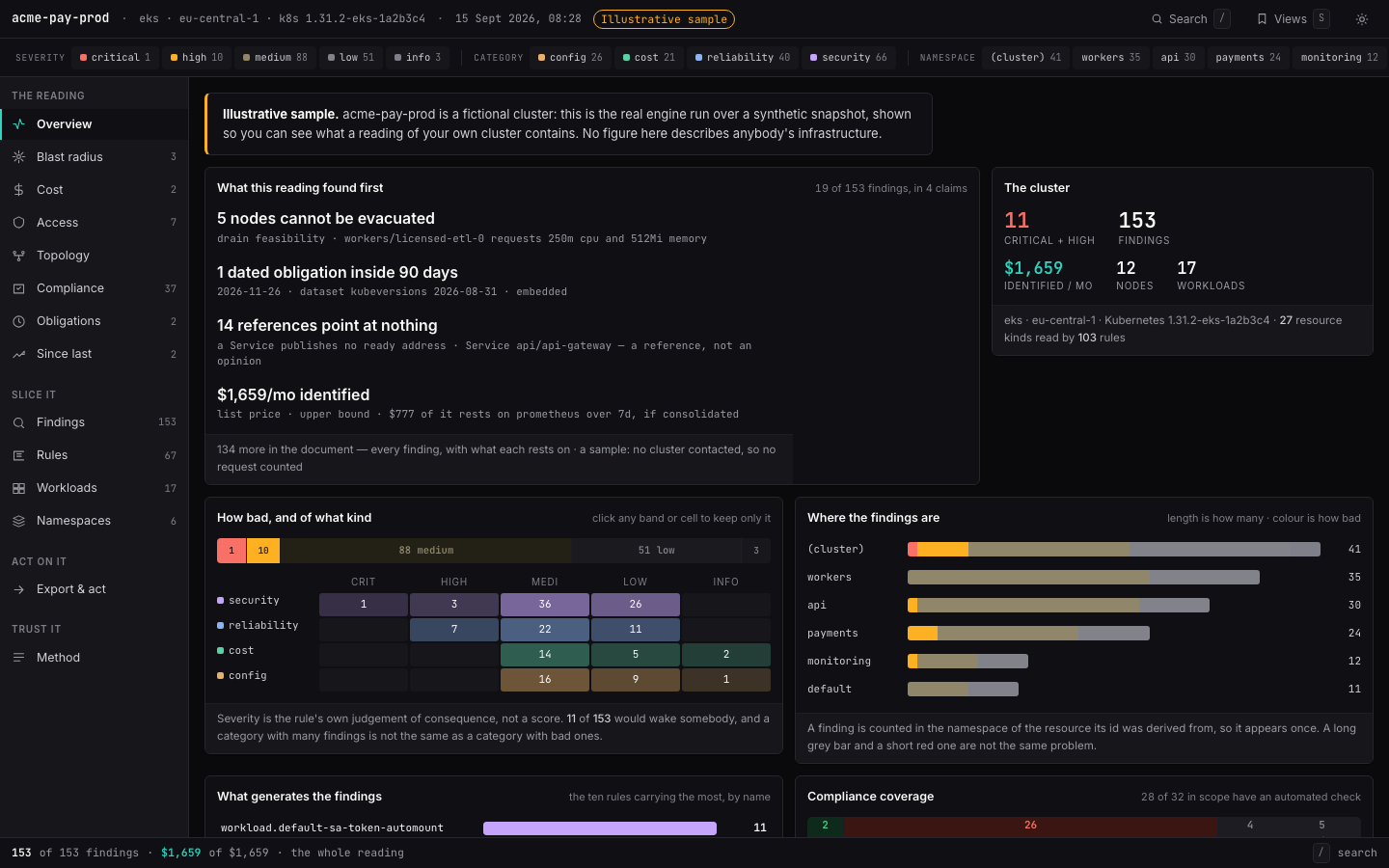
      A reading you work in, not a PDF you scroll.

      One self-contained file: every finding with its object, every dollar with its rate, and what could not be read named as such — never counted as clean.

      The sample reading, live in the page — the file shoalcheck audit --output reading.html writes on a Pro licence: 153 findings on the sample cluster, every workspace working.
      Open the sample reading A fictional cluster through the real engine, labelled as a sample on every screen.
      Read them all

      A fleet is one file.

      Production, staging and recovery, read by the engine and put together the way shoalcheck fleet does: what they declare differently, side by side, and no value marked as the right one.

      A context that could not be read is named, never counted as a cluster with no problems.

      Open the sample fleet
      The sample fleet itself, live — Illustrative sample: acme-pay-prod 153 findings, acme-pay-staging 149, acme-pay-dr 134; $1,659 a month identified on production and on staging, read from their own Prometheus, and $1,647 on acme-pay-dr, from a metrics.k8s.io snapshot; 436 findings and $4,965 a month across the fleet; every context read.
      The desktop app

      A full application, not a script.

      Pick a cluster, ask a question, read the answer. Every reading kept and comparable, ⌘K to anything.

      The demo is the real window replaying a session recorded against our kind test cluster. Nothing in it talks to a cluster.

      The app's real window in the page, not a recording of it: the same HTML the app draws, replaying a session recorded against our kind test cluster. Open it to click through Home, a reading, Preflight and Plan.
      Deadlines

      When your version stops being supported.

      The dates every reading places a version by, and what the extra time costs. Pick yours.

      Your clusters

      Provider

      —

      —
      Ordinary support
      —
      Paid extension
      —

      The newest versions · tap one

        ordinary supportpaid extensiontoday

        How it compares

        What it does, and what the others do.

        Eleven capabilities, each read off the tool's own documentation on 2026-10-20. Tap or hover a mark for its source.

        Shoalcheck against Kubescape, Trivy, Popeye, Kubecost, Komodor and Chkk across eleven capabilities, each read from that tool's own documentation on 2026-10-20. Three are in none of their docs that day: what a finding does not establish, drain / zone / upgrade preflight, and one signed offline report.

        Pricing

        Preflight is free. The full reading is the product.

        Priced by the clusters you read in any 30 days — never by node, never by seat. A licence is checked offline.

        Free

        For a first look at any cluster.

        $0
        no account, nothing to pay
        • Preflight: drain, zone, upgrade
        • The size of any reading: problems by severity and kind, and what they cost
        • The desktop app's live run
        Download

        Pro

        For an engineer with a few clusters.

        $59/ month
        billed monthlyyearly: two months free
        3 clusters in any 30 days
        • Every finding, with its evidence and fix
        • The HTML report and JSON
        • History, diff and comparisons
        • Markdown, CSV and SARIF exports
        • The desktop app's workspace
        Buy Pro
        TEAMS

        Team

        For a platform team and its pipeline.

        $299/ month
        billed monthlyyearly: two months free
        20 clusters in any 30 days
        • Everything in Pro
        • Fleet: many clusters in one reading
        • The gate in CI and scheduled readings
        • Jira and Linear tickets
        • The MCP server for an assistant
        Buy Team

        Business

        For an organisation running many clusters.

        $899/ month
        billed monthlyyearly: two months free
        100 clusters in any 30 days
        • Everything in Team
        Buy Business

        A licence is a signed key the binary checks offline — no phoning home. Reading the same cluster again costs nothing, and preflight is never counted. Prices in US dollars, before any sales tax or VAT. Sold through Paddle, the merchant of record — terms, privacy, refunds.

        Download

        macOS, Windows and Linux.

        The command line and the app read the same way and take the same licence key. They need only the kubeconfig you already use.

        Homebrew

        brew install shoalcheck/tap/shoalcheck

        macOS and Linux, from the first stable release; release candidates are downloads only.

        As a kubectl plugin

        kubectl shoalcheck preflight drain node-1

        Put kubectl-shoalcheck from the release on your PATH; kubectl finds it by its name.

        Staying current

        shoalcheck upgrade

        The app tells you when a new version is out and installs it after checking its signature; a Homebrew install upgrades through it.

        Every release publishes SHA-256 sums, signed with cosign.

        Questions

        Before you run it on production.

        Does it install anything in my cluster?

        No. It is a binary on your machine that talks to the Kubernetes API with your kubeconfig, issuing get and list. There is no agent, operator, CRD or webhook, and nothing to uninstall.

        What access does it need?

        Read access to the kinds it lists — shoalcheck audit --show-permissions prints them before it connects. With less, it still runs, and says which kinds it could not read and why. A refused read is never reported as a clean one.

        Does any data leave my machine?

        Nothing about your clusters. The binary talks to your API server and, when one is reachable, to Prometheus. Two other requests, both yours to make: the update check — shoalcheck upgrade, or the desktop app once a day if you leave that switch on — which asks github.com for the newest release; and, only when you run ticket push, the finding's text and object names to your own Jira or Linear.

        Which clusters does it work with?

        Any conformant Kubernetes cluster it can reach. Costs are priced from bundled list prices for EKS, AKS and GKE; on any other cluster a figure says “unpriced” rather than inventing a rate.

        What counts as a cluster on my plan?

        A distinct cluster, by its kube-system UID, read with a licence in any 30 days — counted on your machine. Reading the same cluster again costs nothing, and preflight is never counted.

        How is the licence checked?

        Offline. A key is a signed document naming your plan, its expiry and its cluster cap, and the binary verifies the signature without phoning home. Paste it into the app under Plan & licence, or run shoalcheck licence install.

        What does the free plan include?

        Preflight in full, and the size of any reading: how many problems, how serious, of what kind, what they would cost, and the five most serious kinds. Which objects, the evidence and the fix for each are what a licence adds. Nothing is saved, written or exported.

        Why does my computer warn me when I open it?

        From 0.1.0-rc.12 the macOS app and command line are signed with a Developer ID and checked by Apple's notary service, so macOS opens them without asking; the Windows builds are not code-signed yet, so SmartScreen asks once. Each release publishes the archives' SHA-256 sums, signed with cosign, so you can check what you downloaded with cosign verify-blob and the public key beside the releases.
        Read your own cluster next.

        Preflight and the size of any reading are free, with no account. Every finding with its evidence and fix is Pro: $59 a month, or $590 a year.

        "Just the output" hides our sentences and keeps what the product printed — the reading, the terminals, the scenes, the calculator — with every caption that says what each rests on.